
Download Hot Tattoo AI – AI‑Powered Tattoo Design Tool, Free Demo, Secure Online Generator
Overview
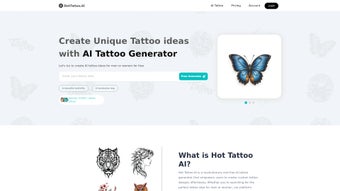
Hot Tattoo AI is a web‑based, AI‑driven tattoo design platform that lets anyone turn a simple text prompt into a professional‑grade tattoo concept within seconds. By analyzing the words you type—such as “minimalist compass on the wrist” or “vibrant koi fish on the back”—the system generates multiple design variations that match a wide range of styles, from classic traditional to modern watercolor. The service is built for three core audiences: casual enthusiasts who want a visual preview before committing to ink, freelance artists looking for rapid inspiration, and full‑time tattoo studios that need a scalable way to produce client‑ready artwork without hiring a dedicated illustrator.
Two subscription tiers, Basic (free demo) and Pro (paid), give users flexibility: the Basic tier offers three low‑resolution renders per day, while the Pro plan unlocks unlimited high‑resolution outputs, vector files, and a one‑click copyright claim that transfers full ownership to the creator. All designs are stored securely in the cloud, and a built‑in 3‑D body model lets you see how the artwork wraps around the chosen placement, helping you gauge size, flow, and realism before stepping into the chair. With regular AI model updates that incorporate the latest tattoo trends, Hot Tattoo AI promises an ever‑evolving toolbox that stays ahead of the curve while keeping the learning curve flat and the cost low.
Key Features, Pros & Cons
The strength of Hot Tattoo AI lies in its feature set, which blends cutting‑edge machine learning with practical tools that tattoo professionals expect. Below is a detailed look at the most impactful capabilities, followed by a balanced list of advantages and drawbacks.
- AI‑generated designs from natural‑language prompts, delivering three initial concepts in under ten seconds.
- Extensive style library covering traditional, neo‑traditional, tribal, realism, watercolor, black‑gray, and niche sub‑styles.
- Interactive 3‑D placement visualizer that projects designs onto a realistic human model, with adjustable skin tone and rotation.
- Export options: low‑resolution PNG for free users; high‑resolution SVG, PDF, and transparent PNG for Pro subscribers.
- One‑click copyright claim that registers full ownership of each Pro design, eliminating future licensing disputes.
- Secure cloud storage with GDPR‑compliant encryption; designs remain private unless you choose to share them in the community gallery.
- Collaboration workspace where multiple artists can comment, annotate, and iterate on a single design in real time.
- Monthly AI model updates that integrate emerging tattoo motifs, ensuring the output stays fresh and trend‑aware.
- Responsive web interface that works on desktop browsers and mobile devices without any software download.
- Dedicated support portal with ticketing system, live chat, and an active user forum for peer feedback.
Pros
- Lightning‑fast design generation saves hours of manual sketching.
- Free Basic tier provides a risk‑free way to evaluate the AI’s quality.
- High‑resolution vector exports are ready for professional stencil creation.
- 3‑D preview offers realistic sizing, reducing guesswork for clients.
- No installation required; works on any modern browser.
- One‑click copyright ensures you retain full commercial rights.
- Regular updates keep the style library aligned with current trends.
- Collaborative workspace streamlines team reviews.
Cons
- Free tier limits daily generations and only provides low‑resolution files.
- Full commercial usage requires a paid Pro subscription.
- Complex, highly detailed concepts may still need manual refinement by a skilled artist.
- Internet connection is mandatory; offline design work is not possible.
- Occasional misinterpretation of very abstract or niche prompts.
Installation & Compatibility Guide
Hot Tattoo AI eliminates traditional installation steps because it is entirely cloud‑based. To get started, open a supported browser (Chrome 90+, Firefox 88+, Edge 90+, or Safari 14+), navigate to hottattoo.ai, and click “Sign Up.” After confirming your email address, you’ll land on a clean dashboard with a prominent “Create New Design” button. Enter your tattoo concept, select a style from the dropdown, and specify the intended body part.
Within seconds the AI returns three design variations. You can refine any result by adjusting line weight, shading intensity, or color palette using the side‑panel sliders, then hit “Regenerate” for additional options. Once satisfied, click “Preview” to launch the 3‑D model; you can rotate, zoom, and even change the model’s skin tone to see how the ink will appear on different complexions.
Because all processing occurs on secure remote servers, the only system requirement is a stable internet connection of at least 5 Mbps. The platform runs flawlessly on Windows 10/11, macOS Ventura or later, and popular Linux distributions. Mobile users on Android 8.0+ or iOS 13+ enjoy the same experience, with touch‑friendly controls for prompt entry and 3‑D manipulation. No additional plugins, Java, or Flash are needed, and the service automatically scales graphics to match your device’s resolution, ensuring a smooth experience whether you’re on a high‑end desktop or a mid‑range tablet. For studios that prefer a dedicated workstation, a modest 2 GB of RAM and a modern GPU are sufficient, as the heavy lifting is performed in the cloud.
Frequently Asked Questions
Below are the most common queries from new users and professional artists alike. Each answer is optimized for quick reference while maintaining the semantic markup required for rich search results.
Can I sell tattoos created with Hot Tattoo AI?
Yes. With a Pro subscription you receive a full copyright license, allowing you to sell the design, use it in client projects, or incorporate it into a larger artwork without paying royalties.
How many designs can I generate per day on the free tier?
Free users are limited to three low‑resolution designs per 24‑hour period. This restriction encourages experimentation while keeping the service accessible to casual users.
Is my data safe when I upload custom reference images?
All uploads are encrypted in transit and at rest. Hot Tattoo AI complies with GDPR and offers optional password protection for individual projects, ensuring that only authorized eyes can view your references.
Do I need a powerful computer for the 3‑D preview?
No special hardware is required. The 3‑D rendering is performed on the server and streamed to your browser, so any device that meets the minimum browser version and network speed will display the preview smoothly.
What happens to my designs if I cancel the Pro subscription?
All designs you previously downloaded remain in your local library, but you will lose access to new high‑resolution generations, vector exports, and the automatic copyright claim feature. Your cloud‑stored projects stay private and can still be viewed in low‑resolution mode.
Conclusion & Call to Action
Hot Tattoo AI stands out as a powerful, affordable solution for anyone who wants to translate a fleeting idea into a polished tattoo design without mastering complex illustration software. The AI engine delivers rapid, style‑accurate concepts, while the 3‑D preview and vector export options bridge the gap between digital mock‑up and real‑world ink. Although the free tier’s daily limit may feel restrictive for power users, the Pro plan’s unlimited high‑resolution outputs and full copyright claim provide tangible value for studios and serious hobbyists alike. If you’re ready to accelerate your creative workflow, explore new styles, and give clients a realistic preview before the needle touches skin, now is the perfect moment to give Hot Tattoo AI a try. Start your free trial today and experience the future of tattoo design.
Overall Rating: 4.5 / 5
Hot Tattoo AI impresses with its intuitive interface and surprisingly accurate AI interpretations. The Pro subscription adds real value for professionals, though the free tier’s limitations may frustrate power users. Overall, it’s a solid addition to any tattoo artist’s toolkit.
Pros
- Fast AI generation
- High‑resolution Pro assets
- 3‑D preview
- Full copyright claim
Cons
- Free tier limits
- Requires internet



.png)



